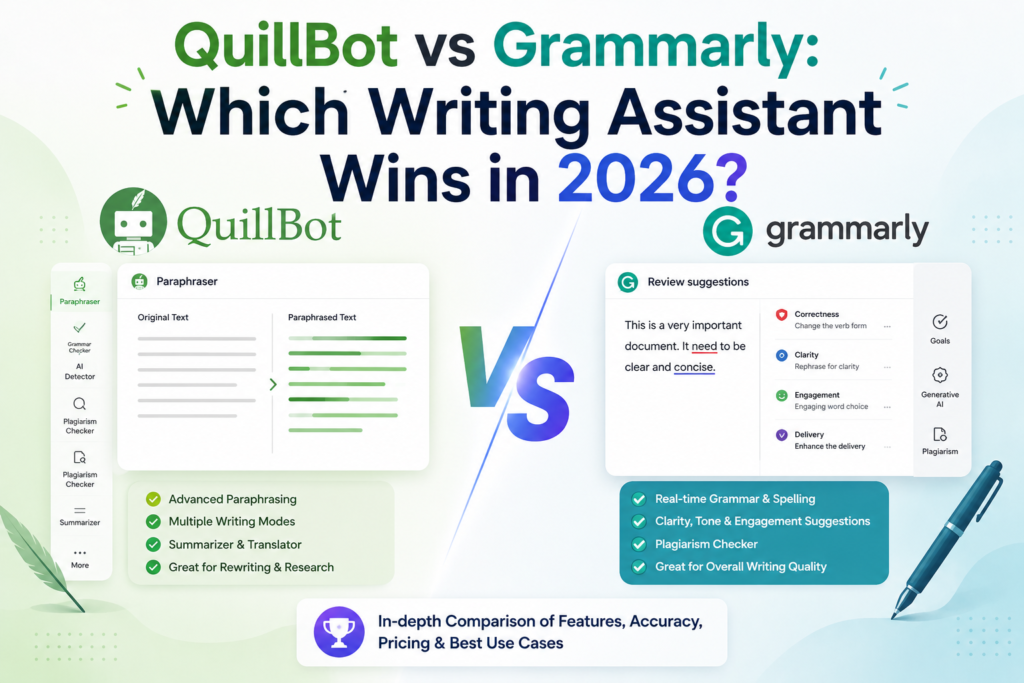
QuillBot vs Grammarly: Which Writing Assistant Wins in 2026?
Affiliate Disclosure: This post contains affiliate links. If you buy through them, AIGearTools may earn a commission at no extra cost to you. Our verdicts come from hands-on testing of both products on identical texts — never from sponsorships.
Quick Answer (AI Overview)
Grammarly wins for professionals — superior error detection, tone analysis, and coverage across email, browsers, and documents make it the better everywhere-editor at $12/month. QuillBot wins for students and budget users — its paraphraser is the best available, the full toolkit costs less ($10/month, with frequent discounts), and its free tier is more generous for rewriting tasks. Many writers use Grammarly to check and QuillBot to rephrase.
Two Assistants, Two Theories of Help
The quillbot vs grammarly question gets asked thousands of times a month, usually by someone with $10–12 to spend and an essay due. The comparison is genuinely close because the products embody different theories of writing help. Grammarly assumes your words are basically right and need correcting and calibrating — errors fixed, tone tuned, flab cut. QuillBot assumes your words are a first attempt that needs transforming — paraphrased into fluency, condensed into summaries, expanded from notes.
We tested both Premium tiers for three weeks on identical material: our standard 60-planted-error document, 30 paraphrasing passages (including academic prose and ESL-style drafts), real emails and reports, plus each tool’s summarizer, citation features, and AI detection claims. Both tools also feature in our Grammarly deep-dive review and the best AI writing tools master ranking; this head-to-head settles the specific either/or.
QuillBot vs Grammarly: Comparison Table
| Feature | QuillBot | Grammarly |
| Core strength | Paraphrasing & rewriting | Error detection & tone |
| Free plan | 125 words/paraphrase, 2 modes | Full basic grammar/spelling |
| Premium price | $10/mo (annual ~$5–8 with deals) | $12/mo annual ($30 monthly) |
| Grammar checking | Good | Excellent (57/60 in our test) |
| Paraphrasing modes | 9 modes + synonym slider | Basic rewrite suggestions |
| Summarizer | Strong, adjustable length | Basic |
| Tone detection/rewrites | Limited | Best-in-class |
| Plagiarism checker | Yes (page limits) | Yes (Premium) |
| Citation generator | Yes, free | Limited |
| Works everywhere | Browser ext., Word, mobile | Browser, OS-level apps, Word, mobile |
| Best for | Students, ESL writers, budget users | Professionals, teams, daily email |
| Our rating | 4.1/5 | 4.7/5 |
Round 1: Grammar and Error Detection
We ran both checkers over our 60-error gauntlet — typos through subtle parallelism faults. Grammarly Premium caught 57, including 9 of 10 advanced-style errors. QuillBot’s grammar checker caught 46: all the basics, most intermediate issues, but it waved through several misplaced modifiers and agreement traps in long sentences. QuillBot’s checker is genuinely good — better than most free tools — but Grammarly’s decade of head start on error detection shows exactly where it should: in the errors you would not have caught yourself, which are the only ones worth paying for.
Grammarly also explains why something is wrong more pedagogically, which compounds for learners.
Winner: Grammarly, clearly.
Round 2: Paraphrasing and Rewriting
Total reversal. QuillBot’s paraphraser is the best single rewriting tool we have tested anywhere — nine modes (Standard, Fluency, Formal, Academic, Simple, Creative, Expand, Shorten, Custom) plus a synonym-intensity slider give you control no chatbot prompt matches for speed. On our 30-passage test, QuillBot’s Fluency mode turned ESL-style drafts into natural English while preserving meaning in 27 of 30 cases; its Academic mode handled formal register convincingly; and the side-by-side interface with clickable synonyms makes iterating frictionless.
Grammarly offers full-sentence rewrites and paragraph-level “improve it” suggestions that are excellent within its correcting philosophy — tightening and clarifying your wording — but it has nothing like mode-based transformation. Ask Grammarly to make a paragraph academic and you are really asking its generative feature, which is serviceable and prompt-hungry.
Winner: QuillBot, decisively — this is the reason it exists.
Round 3: Beyond the Core — Summarizer, Citations, Plagiarism, AI Detection
QuillBot’s supporting cast is built for students: a genuinely strong summarizer (paste a 5,000-word reading, get accurate bullets or paragraphs at adjustable length), a free citation generator covering major formats, a translator, and a plagiarism checker with monthly page limits. Grammarly’s extras serve professionals: best-in-class tone detection (the feature that stops regrettable emails), strategic clarity suggestions, snippets, and a robust plagiarism checker without page anxiety, plus newer authorship/AI-detection features aimed at academic integrity workflows. On AI detection, treat both tools’ detectors as probabilistic hints, never proof — our tests produced both false positives and false negatives, consistent with the entire detector industry.
Winner: tie — QuillBot’s extras suit coursework; Grammarly’s suit careers.
Round 4: Coverage — Where Each Tool Can Help You
Grammarly’s quiet moat is presence. Browser extension, native Windows/Mac apps that work in nearly any text field, Word and Outlook add-ins, mobile keyboards — it improves your writing in Slack, CRMs, LinkedIn, and web forms without you summoning it. QuillBot covers the essentials (browser extension, Word add-in, Chrome, mobile apps, plus its own editor) and has expanded steadily, but day-to-day we hit more contexts where Grammarly was present and QuillBot was not than the reverse. If your writing happens in fifty different boxes a day, presence is the product.
Winner: Grammarly.
Round 5: Pricing and Free Plans
| Plan | QuillBot | Grammarly |
| Free | 125-word paraphrases, 2 modes, summarizer (limited), citations | Unlimited basic grammar/spelling/punctuation, basic tone |
| Premium monthly | ~$20 | $30 |
| Premium annual | ~$10/mo (sales often push to $5–8/mo) | $12/mo |
| Students | Frequent steep discounts | Many universities license it free |
For pure correction on a $0 budget, Grammarly free is the stronger product — unlimited checking versus QuillBot’s nibble-sized paraphrase allowance. For paid value, QuillBot is cheaper, especially during its frequent promotions, and bundles more distinct tools per dollar. Students should check both escape hatches before paying anything: university Grammarly licenses are common, and QuillBot’s student discounts are aggressive. (Both belong in our free AI writing tools stack regardless.)
Winner: QuillBot on paid value; Grammarly on free correction.
The Verdict by User Type
- Professional whose emails and docs face clients: Grammarly. Tone detection and everywhere-coverage are the job.
- University student juggling readings and essays: QuillBot — summarizer, citations, paraphraser, and price align perfectly with coursework. Add Grammarly free as the final-pass checker.
- ESL / non-native English writer: QuillBot’s Fluency mode is the single most useful feature in this entire comparison for you; Grammarly Premium is the worthy upgrade later for its explanatory corrections.
- Content creator/blogger: Grammarly as the publish-gate; QuillBot’s Shorten mode earns a spot for tightening drafts. Pair both with the drafting workflow in our AI blog writing guide.
- Teams: Grammarly Business — style guides, brand tones, and analytics have no QuillBot equivalent.
- Tightest budget: QuillBot Premium on a promotion, plus Grammarly free. Total: under $8/month for 90% of both products’ value.
A Week with Both Tools Running
The texture of daily use, from our test diary. Monday: a 4,800-word assigned reading went through QuillBot’s summarizer before a meeting — the bullet output missed one nuance but saved forty minutes; Grammarly silently fixed eleven typos across the day’s email. Tuesday: an ESL teammate drafted a partner update, ran it through Fluency mode, then Grammarly’s tone check before sending — the two-tool pipeline produced the most natural English he had shipped unaided, his words. Wednesday: Grammarly’s “sounds harsh” flag on a feedback message prompted a rewrite we were glad of by Thursday. Thursday: QuillBot’s Shorten mode compressed a rambling 900-word draft section to 600 in two passes; Grammarly then caught an agreement error the compression introduced — a perfect illustration of transformer-then-guardian ordering. Friday: citation generator assembled a reference list in minutes; Grammarly’s plagiarism check cleared a freelancer submission. Neither tool had an idle day, and neither could have covered for the other.
6 Tips for Getting More from Either Tool
- Order matters: transform first (QuillBot), verify last (Grammarly). Reversing it wastes the verification.
- In QuillBot, work a paragraph at a time and read every output — modes occasionally shade meaning, and the synonym slider’s aggressive end is where it happens.
- Use Custom mode (QuillBot) with an instruction like “formal but plain, keep all numbers exact” — it outperforms the preset modes on business text.
- Set Grammarly goals per document (audience, formality) to stop it flattening expert writing.
- Add jargon to both dictionaries in week one to silence repeat false positives.
- Students: exhaust the free escape hatches first — institutional Grammarly licenses and QuillBot student promotions routinely make this entire comparison cost under $5/month.
Can You Replace Both with ChatGPT?
The honest question of 2026. A frontier chatbot can paraphrase, summarize, and proofread — and for occasional use, the free tiers in our chatbot comparison cover it. What the specialists still buy you: QuillBot’s interface speed (mode buttons and synonym sliders beat writing prompts for the hundredth rewrite of the day) and Grammarly’s passive presence (it checks the email you forgot to check). Heavy daily users keep the specialists; light users increasingly do not. Knowing which user you are is the real purchasing decision.
What Changed in Both Tools This Year
Both products have been busy, in revealingly different directions. QuillBot has broadened from paraphraser toward full writing suite — its grammar checker improved measurably year over year in our retests, the Flow document editor matured, and AI detection joined the toolkit (with the same reliability caveats as everyone’s). Grammarly, meanwhile, has been building an agent platform on top of its checker — proofreading and citation agents, expanded authorship tooling for education, and the integration of its acquired docs platform pointing toward a future as a productivity suite rather than a red-underline engine. The strategic read for buyers: QuillBot is climbing toward Grammarly’s territory on correction while Grammarly climbs past correction entirely — which keeps this comparison’s core advice stable even as both feature lists grow.
A Note on Academic Honesty
Because half of QuillBot’s audience is students, plainly: paraphrasing a source without citation is plagiarism whether a tool did the rewording or not, and using AI rewriting to disguise copied work violates academic integrity policies everywhere. The legitimate uses — improving your own drafts, learning fluent constructions, summarizing your readings — are exactly what these tools are good at. Use them as a writing coach, not a laundering service; detectors are unreliable, but graders’ instincts and oral defenses are not.
The Decision in One Paragraph
Strip away nine modes and tone meters and the choice reduces to a single honest question: when you reread your own writing, what do you wish were different? If the answer is “the mistakes I miss” — agreement slips, tone misfires, the comma you have never been sure about — your problem is verification, and Grammarly is the purpose-built verifier. If the answer is “the way it sounds” — stiff where you want fluent, long where you want tight, casual where the assignment demands formal — your problem is transformation, and QuillBot is the purpose-built transformer. Most writers, asked honestly, know which sentence describes them within five seconds, and that answer is worth more than every comparison table in this article, including ours.
How We Tested
Three weeks of parallel Premium use; the 60-error planted document scored on both checkers; 30 matched paraphrasing passages (academic, business, ESL-style) graded by two editors for meaning preservation and naturalness; summarizers tested on three long documents against our own abstracts; coverage mapped across 12 daily writing contexts; pricing and student offers verified May 2026.
Frequently Asked Questions
Grammarly is better for grammar checking, tone, and professional use across all your apps; QuillBot is better for paraphrasing, summarizing, and student budgets. They overlap less than their marketing suggests — many writers run Grammarly free plus QuillBot Premium.
Yes — it caught 46 of 60 errors in our test, beating most free checkers. Grammarly caught 57, with the gap concentrated in subtle style-level errors, which is what Grammarly Premium is effectively charging for.
Yes. QuillBot Premium runs about $10/month annually (often $5–8 during promotions) versus Grammarly Premium’s $12/month annual. QuillBot also bundles citations and a stronger summarizer at that price.
Yes, and it is the power-user setup: QuillBot transforms (paraphrase, condense, formalize), Grammarly verifies (errors, tone, clarity) as the final pass. Their browser extensions coexist without conflict in our testing.
Policies vary — paraphrasing your own writing is generally fine, while rewording sources without citation is plagiarism everywhere. Check your institution’s AI and integrity policies, and when in doubt, cite and ask.
Grammarly offers sentence rewrites and generative rewriting on request, but nothing matching QuillBot’s nine purpose-built modes and synonym control. If paraphrasing is your primary need, QuillBot is the tool.
QuillBot for transformation — its Fluency mode converts non-native phrasing into natural English faster than any alternative we tested. Grammarly for learning — its explained corrections teach the underlying rules. The ideal ESL setup is QuillBot Premium plus Grammarly free, upgrading Grammarly once budget allows.
Neither performs its AI processing offline — both require an internet connection for paraphrasing, advanced checks, and rewrites. Basic typing continues fine; suggestions resume when connectivity returns, which matters mainly for travelers and exam environments.
Final Verdict
The quillbot vs grammarly contest splits cleanly along the line of what you need done to your words. Grammarly (4.7/5) is the superior guardian — the best error-catcher available, everywhere you type, with tone radar that pays for itself one saved email at a time. QuillBot (4.1/5) is the superior transformer — the best paraphraser on the market with a student-priced toolkit around it. Professionals should default to Grammarly; students and ESL writers to QuillBot; and the genuinely word-obsessed should notice the two subscriptions together still cost less than one streaming bundle — which, for people who live by their writing, is the quiet bargain of this whole category.
And if even the one-paragraph decision feels premature, run the zero-cost trial both products quietly offer: a week of Grammarly free on your real email plus a week of QuillBot free on your real drafts. The tool you find yourself missing on day eight is your answer.